Sprocket Sports
3.4 43.00 Reviews
Analysis By AppCompare
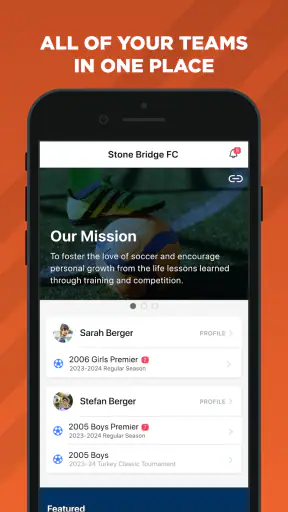
Managing a youth sports program usually involves more than putting names on a roster. There are registrations to organize, teams to coordinate, and updates to keep moving between administrators, coaches, players, and families. Sprocket Sports approaches that problem as a sports enrollment and team-management app from Sprocket Sports. I found its appeal less in flashy presentation and more in the idea of bringing routine club administration into one place.
It is free to use, aimed at Everyone, and available for devices running Android 8.0 or later. The app has been available since August 27, 2021, and its current version is 6.0.22. With more than 50 thousand installs, it is clearly intended for real sports organizations rather than a single athlete tracking personal workouts. My overall impression is that it can be useful when a club has already adopted the Sprocket system, but the experience depends heavily on how well the organization sets up its information and communicates the correct access details.
Where people usually get stuck before the first useful screen
The first important thing to understand is that this is not the kind of sports app I would install simply to follow scores or record a run. Its purpose is administrative and organizational. That changes what “working properly” means. A parent may expect to open it and immediately see a child’s team, while a coach may expect a roster to appear as soon as the app is installed. In practice, those views depend on the account and team information being connected correctly.
That is why some early frustration can look like an app failure when it is really an account-setup issue. If the wrong email address was used during registration, if an invitation went to another address, or if a family member has more than one account, the expected team information may not appear. I would check those details before repeatedly reinstalling the app. Reinstallation cannot correct information that has not been associated with the right user profile.
Another common source of confusion is role. A club administrator, coach, parent, and player may not see identical information. A coach looking for team-management tools should not assume that a parent account will display the same controls. Likewise, a family member may be waiting for an enrollment or roster update that only an administrator can complete. The most useful first question is not “Why is the app broken?” but “Which account and role should be seeing this information?”
The modest average rating of 3.4 from roughly one hundred ratings reflects that this kind of product can be judged harshly when a setup step is unclear. That does not automatically make it unsuitable, but it does tell me to approach the first session methodically. Administrative apps are especially sensitive to small mismatches because the user is not only viewing content; they are relying on records maintained by an organization.
What I would clarify before asking a club for help
Before contacting an administrator, I would write down the exact symptom: whether the app will not open, whether sign-in fails, whether the account opens but shows no team, or whether one particular part of the enrollment process is unavailable. Those are different problems and need different fixes. A precise description saves time compared with saying only that “Sprocket Sports does not work.”
I would also confirm which person is affected. If one parent cannot see a child but another family member can, the issue is probably tied to the account relationship rather than the whole organization. If every coach on a team is missing the same information, the administrator may need to review the team setup. This distinction is one of the most practical lessons from using a club-management platform: the app is only one layer of a larger information chain.
Setup checks that prevent avoidable trouble
I recommend starting with a clean, simple setup. Install the app on a supported device, use the email or account identity that the club already has on file, and avoid creating a second profile just because the first login does not immediately show a roster. Duplicate profiles can make later corrections more confusing, especially when a family has several children or more than one adult managing the same registration.
After signing in, I would look for the basic expected context before trying every available action. Does the correct organization appear? Is the relevant child, player, or team visible? If the screen is empty, I would pause there instead of assuming that tapping through unrelated areas will repair the connection. Empty information is often a signal to verify enrollment or account association with the club.
A useful setup habit is to keep the organization’s terminology in front of you. Clubs may use a program name, age group, division, or team label that is slightly different from the casual name families use in conversation. When asking for assistance, using the exact label shown in the organization’s message can help an administrator find the right record more quickly.
I would also test the app when the phone has a stable internet connection. A team-management platform needs to exchange current information with its service, so a weak or interrupted connection can make a page look incomplete or leave an action appearing to stall. Switching between unreliable mobile reception and a congested public network can create misleading results. A short test on a dependable connection is a better diagnostic step than immediately changing multiple settings at once.
Keeping the app updated is sensible as well. The current release is 6.0.22, and using an older installation can make troubleshooting harder because the screens or behavior may differ from what the organization expects. I would update through the normal app store process, restart the app, and then repeat the same action once. I would not repeatedly tap a submission button while waiting, because that can create uncertainty about whether an enrollment or request was sent once or more than once.
A practical first-session routine
Confirm that the phone meets the Android requirement and that the app is installed from the official store.
Use the account identity already associated with the sports organization rather than making a new profile immediately.
Check the organization, player, and team context before editing anything.
Try one small, low-risk action, then verify whether the screen reflects the change.
Record the exact message or missing item if the expected result does not appear.
This routine may sound cautious, but it suits the app’s role. Sprocket Sports is handling information that families and clubs may rely on for participation, so guessing is less helpful than confirming one connection at a time. I also prefer this approach because it separates a display problem from a record problem. If the information exists but the app is not refreshing, the next step differs from a situation where the organization has not completed the enrollment.
Recovering a workflow when something goes wrong
When a workflow stops halfway through, I would first return to the last screen that clearly showed a successful state. For example, if I began an enrollment process and then the app appeared to freeze, I would reopen the relevant area and look for evidence that the action was already recorded before trying again. This avoids accidental duplicates and gives a clearer picture of what actually failed.
If the app closes unexpectedly, I would reopen it and repeat only the final step rather than the whole process. If the same action fails twice under a stable connection, I would stop experimenting and capture the details for the club administrator. The useful information includes the account being used, the organization or team involved, the action attempted, and the point at which the workflow stopped. That is much more actionable than clearing everything and losing the context.
For a family managing several players, I would handle one player at a time and verify the result before moving to the next. This is a non-obvious but valuable trade-off: doing everything in one long session feels faster, yet it makes it harder to identify which player record or team relationship caused a problem. A short confirmation after each change reduces the chance of carrying one mistake through the rest of the setup.
Coaches can use a similar approach with rosters. Before assuming that a player is missing from the team, I would check whether the issue affects one person or the whole roster. One missing player may point to enrollment or assignment information. A completely absent roster may indicate that the account is not connected to the coach’s expected role, or that the organization has not finished publishing the team information.
Administrators should be especially careful when correcting records. The app can make team management more convenient, but convenience does not remove the need for a clear internal process. I would decide who is responsible for confirming enrollment, who handles team assignments, and who answers parent questions. Without that ownership, users may send the same request to several people and receive conflicting instructions, making the platform seem more complicated than it is.
How I would handle a missing update
If a change does not appear, I would first refresh by leaving and reopening the relevant area, then check whether the account is still connected to the correct organization. I would avoid changing unrelated profile details as a test. A useful recovery process changes one variable at a time: connection, app version, account identity, then organization-side confirmation.
There is also a human side to recovery. If a coach tells a parent that a roster has been updated but the parent still sees old information, both sides should compare the exact player and team context rather than simply repeating the update. The coach may be looking at an administrative record while the parent is viewing a different relationship. Clear screenshots or exact labels can help, provided they do not expose information belonging to other families.
That privacy-minded habit matters in team environments. A sports organization contains information about multiple children and families, so troubleshooting should focus only on the affected account and record. I would not forward a full roster or share another family’s details just to demonstrate that one entry is missing. The best support request is narrow and specific.
When the app is not the real cause
Some problems are outside the app itself. A club may not have finalized a team, an administrator may still be processing an enrollment, or a player may have been assigned under a different program label. In those cases, the app can display exactly what the organization has made available while still failing to match the user’s expectation. This is why asking the club to confirm the underlying record is sometimes more productive than trying another phone.
Device conditions can also affect the experience. An older Android phone that technically meets the minimum operating-system requirement may still feel less responsive than a newer device, particularly when several apps are open or storage is tight. I would close unnecessary apps, restart the phone, and make sure the system is not aggressively restricting the app in the background. These are general maintenance steps, not guarantees, but they help distinguish a device strain issue from a service or account issue.
Connectivity deserves the same careful treatment. If one screen loads and another does not, I would test again on a different reliable connection before concluding that the organization’s data is missing. If the same problem follows the account across connections and devices, that points more strongly toward an account or organization-side issue. If only one phone has the problem, the device installation becomes more suspicious.
This is also where the app’s category matters. A sports enrollment and team-management tool is not a replacement for every communication channel a club may use. A team might still rely on email, messaging, calendars, or a website for certain notices. I would not expect Sprocket Sports to replace all of those tools unless the organization has deliberately built its workflow around it. Its value is greatest when the club treats it as the central place for the tasks it has chosen to manage there.
Who benefits most from this approach
I think the app is best suited to organized clubs that need a shared structure for enrollment and team administration. Parents benefit when they want one recognizable place to check their relationship with a program, while coaches benefit when the organization keeps team information current. Administrators are the people most likely to gain from consistent use because they can reduce scattered spreadsheets, messages, and manual follow-up.
It is less compelling for a casual group that only needs an occasional message or a simple calendar. In that situation, a lightweight messaging service may be easier for everyone to adopt. It may also be the wrong choice for an individual athlete looking for training plans, workout tracking, live scores, or performance analysis. Those needs belong to different types of sports apps, and installing a club-management platform will not address them.
Compared with a spreadsheet, Sprocket Sports offers a more user-facing route for a club’s enrollment and team information, but it also introduces account and role dependencies that a private spreadsheet does not. Compared with ordinary group chat, it should provide a more structured home for records, but it may feel slower when a club has not established clear procedures. The trade-off is straightforward: structure can reduce chaos once everyone follows it, yet it creates friction during adoption.
The audience size suggests a growing but still relatively focused product rather than a universal sports platform. It has passed 50 thousand installs, and its 43 written reviews show that users have shared varied experiences. I would treat that as a reason to judge it against the specific club’s workflow, not as a reason to expect the same result in every organization. The developer, Sprocket Sports, is closely associated with the platform’s administrative purpose, so the club’s implementation choices are likely to matter as much as the app’s interface.
My practical verdict after weighing the daily experience
I see Sprocket Sports as a useful coordination layer for clubs that are prepared to maintain accurate enrollment and team information. Its strongest quality is focus: it is built around the administrative side of sports rather than trying to become a general fitness or entertainment app. When the account is correctly connected and the organization uses the system consistently, that focus can make routine tasks easier to find and follow.
The main weakness is the same thing that gives the app its purpose. Users depend on relationships between accounts, players, teams, and organization records. When one link is wrong or incomplete, the app may feel unhelpful even though the underlying issue is administrative. New users should expect to spend a little time confirming their role and context, and clubs should not assume that installing the app alone completes the setup.
My advice is to install it if your sports organization actively uses Sprocket Sports and has told you which account to use. Follow the small setup routine, verify one player or team record at a time, and contact the club with precise details if something remains missing. I would skip it for personal training, score following, or informal group coordination, where a different type of app will probably be more direct.
For an organization, the decision comes down to discipline as much as software. If administrators keep records current and tell families where each task belongs, this free sports app can become a practical shared workspace. If the club continues to split enrollment, rosters, and updates across unrelated tools without explaining the boundaries, users may blame Sprocket Sports for confusion created elsewhere. My recommendation is positive for clubs committed to one organized workflow, but conditional for everyone else.
FAQ
What is Sprocket Sports used for?
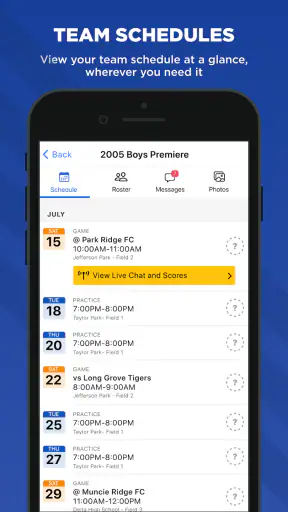
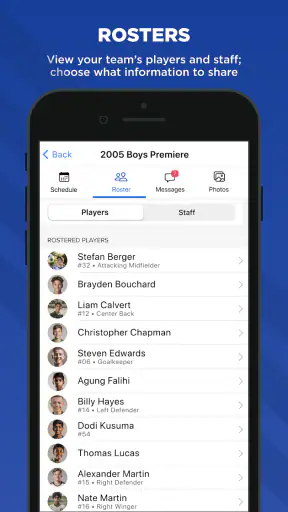
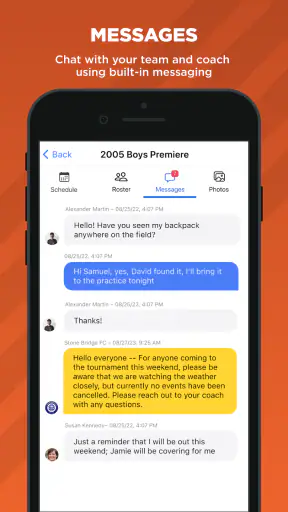
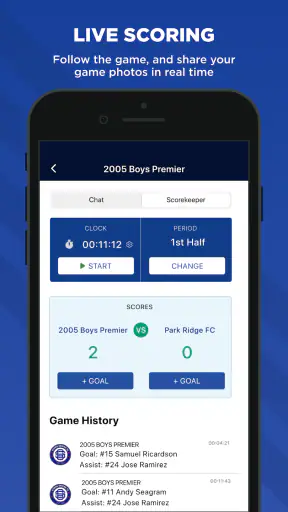
Sprocket Sports is a sports-management platform designed to help organizations, clubs, leagues, coaches, parents, and athletes manage day-to-day activities in one place. Depending on the organization using it, you may be able to view schedules, team information, announcements, registration details, payments, rosters, and other club-related updates. The exact features available can vary because administrators control how the platform is configured.
Do I need an invitation or account to use Sprocket Sports?
In most cases, access is connected to a sports organization, club, league, or team that uses Sprocket Sports. You may need to create an account through an invitation, registration process, or link provided by the organization. Simply downloading the app may not provide access to all features. If you cannot sign in, check that you are using the email address associated with your player or parent profile and contact the organization’s administrator.
Can parents and athletes view schedules and receive team updates?
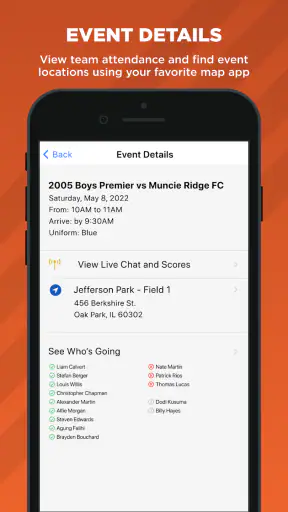
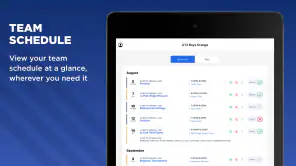
Yes, Sprocket Sports is generally intended to make team communication and organization easier for families and participants. Depending on the setup, users can view practices, games, events, rosters, locations, and announcements, while some organizations may also send reminders or schedule changes through the platform. Availability can differ by club, so important notifications should still be checked through the communication channels recommended by your team.
Can I register for programs or make payments through Sprocket Sports?
Many organizations use Sprocket Sports for registrations, program enrollment, invoices, and online payments, although these options depend on the club or league configuration. Before completing a purchase, review the displayed fees, deadlines, refund rules, and payment details carefully. The app may provide access to registration information, but questions about charges, cancellations, discounts, or refunds usually need to be handled directly by the organization.
Is Sprocket Sports free to download and safe to use?
The app may be available to download without an upfront charge, but participating in a club, league, camp, or program can involve separate registration or membership fees. Sprocket Sports may handle personal information such as contact details, player profiles, schedules, and payment-related data, so users should review the current privacy policy and app-store permissions before using it. Keep your login private and install updates from official sources.
Pros
- Centralizes schedules
- scores
- rosters
- and team updates in one app.
- Useful communication tools help keep families and coaches connected.
- Supports multiple sports and teams under one account.
- Event reminders can make practices and games easier to track.
- Access to team information is convenient while traveling to tournaments.
Cons
- Some features may depend on the organization’s subscription or setup.
- The app can feel cluttered when managing several teams at once.
- Notifications may become excessive for users in many group chats.
- Information quality depends on coaches and administrators updating it.
- Certain actions may require several taps instead of a quick overview.